

See all sent requests
The Your requests area shows the requests the designer has already made. This helps answer simple questions such as:- Which target tags did I request?
- Is the request still pending?
- Was it reviewed yet?
- Can I still cancel it?
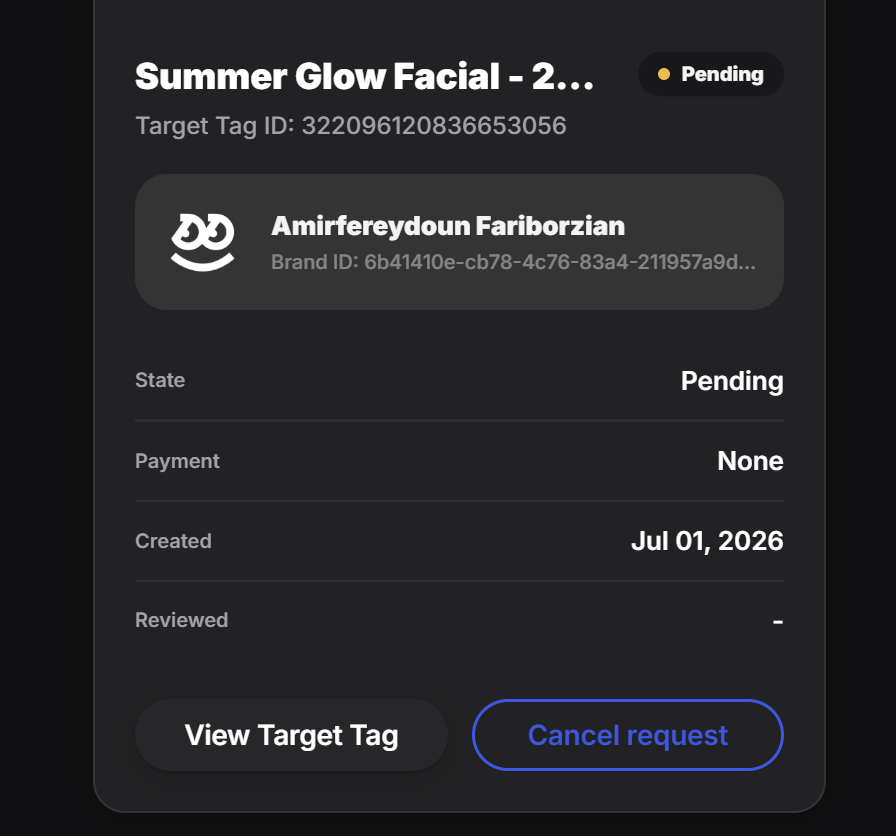
Review one request in detail
When the designer opens a request, they can see its current details, such as:- the target tag
- the current state
- payment status if relevant
- the created date
- whether it has been reviewed yet
Cancel a request if needed
If the designer changes their mind, sent the wrong request, or no longer wants the pin, they can cancel the request from this section. This is useful when:- the wrong target tag was selected
- the campaign changed
- the source tag is no longer the right one
- the request should be withdrawn before approval
Best use of this section
Think of Your Requests as the designer’s request history and follow-up panel. It is the place to:- check status
- monitor progress
- open the target tag
- cancel pending requests when necessary